Install the OpenJDK JRE
install JRE 11 on Linux using apt
Use this procedure on Ubuntu and other Linux distributions that use .deb files for software installation.
-
Open a terminal.
-
Update the system
aptpackage index:# apt update -
Start the JRE 11 installation:
# apt install openjdk-11-jre-headless -
When prompted to continue, type y and press Return to install JRE 11:
Do you want to continue? [Y/n] -
Confirm the install succeeded:
$ java -versionThe command should return the version number much as follows:
openjdk version "11.0.21" 2023-10-17
OpenJDK Runtime Environment (build 11.0.21+9-post-Ubuntu-0ubuntu123.10)
OpenJDK 64-Bit Server VM (build 11.0.21+9-post-Ubuntu-0ubuntu123.10, mixed mode, sharing)
install JRE 11 on Linux using dnf
Use this procedure on Fedora and other Linux distributions that use .rpm files for software installation.
-
Open a terminal.
-
Update the system
dnfpackage index:$ dnf update packageNOTE: This is an abundance-of-caution step and can likely be skipped. Unlike
apt,dnfupdates its package cache automatically. -
Start the JRE 11 installation:
# dnf install java-11-openjdk.x86_64 -
When prompted, type y and press Return to install JRE 11:
Is this ok [y/N]: -
Confirm the install succeeded:
$ java -versionThe command should return the version number much as follows:
openjdk version "11.0.21" 2023-10-17
OpenJDK Runtime Environment (Red_Hat-11.0.21.0.9-1) (build 11.0.21+9)
OpenJDK 64-Bit Server VM (Red_Hat-11.0.21.0.9-1) (build 11.0.21+9, mixed mode, sharing)
install JRE 11 on macOS
-
Open a terminal.
-
Check if the Homebrew package manager is installed.
$ brew -vIf Homebrew is installed, this command returns a version string something like as follows:
Homebrew 4.1.21If Homebrew is not installed, this command returns an error:
command not found: brew -
If Homebrew is not installed, install it.
$ /bin/bash -c "$(curl -fsSL https://raw.githubusercontent.com/Homebrew/install/HEAD/install.sh)" -
Install OpenJDK 11 using HomeBrew.
$ brew install openjdk@11 -
Enable macOS Java wrappers to find OpenJDK.
-
If installed on Intel-based hardware.
# ln -sfn /usr/local/opt/openjdk@11/libexec/openjdk.jdk /Library/Java/JavaVirtualMachines/openjdk-11.jdk -
If installed on Apple Silicon-based hardware.
# ln -sfn /opt/homebrew/openjdk@11/libexec/openjdk.jdk /Library/Java/JavaVirtualMachines/openjdk-11.jdk
-
-
Confirm the install succeeded.
$ java -versionThe command should return the version number much as follows:
openjdk version "11.0.21" 2023-10-17
OpenJDK Runtime Environment Homebrew (build 11.0.21+0)
OpenJDK 64-Bit Server VM Homebrew (build 11.0.21+0, mixed mode)
install JRE 11 on Windows
-
Open a PowerShell instance
-
Change into the current user's Downloads folder
cd Downloads -
Download Microsoft's OpenJDK 11.0.21 LTS installer for Windows from Download the Microsoft Build of OpenJDK
Invoke-WebRequest https://aka.ms/download-jdk/microsoft-jdk-11.0.21-windows-x64.msi -OutFile microsoft-jdk-11.0.21-windows-x64.msi -
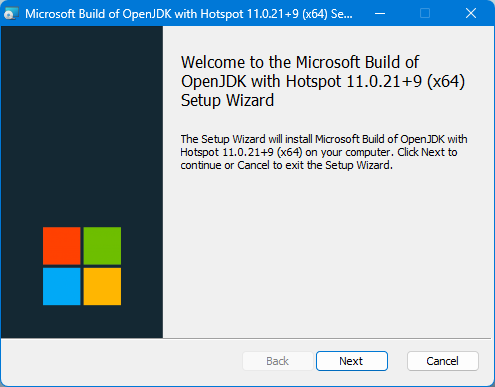
Launch the downloaded installer and follow the on-screen steps.
-
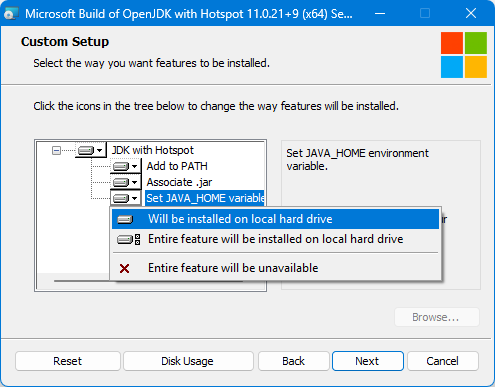
At the Custom Setup step, change the Set JAVA_HOME variable option from Entire feature will be unavailable to Will be installed on local hard drive.
-
Confirm the install succeeded by entering the running the following command in a Command prompt window:
$ java -versionThe command should return the version number much as follows:
openjdk version "11.0.21" 2023-10-17 LTS
OpenJDK Runtime Environment Microsoft-8519785 (build 11.0.21+9-LTS)
OpenJDK 64-Bit Server VM Microsoft-8519785 (build 11.0.21+9-LTS, mixed mode)